
Keywords in the context of SEO are words and / or phrases that people type in the search bar when searching for something - product, service, explanation, guide, description, event…
Keywords are SEO (Search Engine Optimization) is basically because SEO aims to get that when someone enters the name of your service in a search engine - a reference to your website in the SERP (Search Engine Results Page) would appear higher than references to your competitors' websites. Why? Because the CTR of reference 1 in the organic search results (Click-Through Rate) is 28.5 - 39.6%, the second - 15.7 - 18.4%, the third - 10.1 - 11% and only about 2% searchers click on the tenth. By comparison, the CTRs for the first 1 to 4 ads that appear at the very top of the SERPs range from 1.2% to 2.1%. In 2020 organic search results had a CTR of 33,95%, ads shown in the SERP were 1.59, and 64,82% were not followed at all. The conclusions are obvious - if you want people to search for your product, service or anything else on your website - the reference to your website should be in the Top 3 of organic search results, or at least in the Top 10.
The aim is to describe potential buyers so that:
This step is self-evident, but is often missed, so it's often unclear whether a particular keyword is appropriate for a company's target audience at all.
For example, if you have a flower shop and you want to expand your business by offering flower delivery, you could define your target audience as:
The target audience can and in many cases needs to be further subdivided into segments in order to address each of them as accurately and as effectively as possible, for example - to separate women, etc. It is important to record this result of your work (in writing) so that you can always return to it and evaluate the relevance of not only the keywords, but also other activities of the company to your chosen target audience.
Of course, flowers are also bought by others, but by focusing on those who buy them more often, you will be able to create more targeted content and you will probably reach the majority of other buyers with it.
The goal is to find the words and phrases that people use to search for the products and services you offer…
At this stage, try to find as many different keywords as possible. Many of them will not be used, but you can never know which word will help you find new, interesting and fresh content ideas.
There are several paid tools available for selecting and evaluating keywords, such as MOZ, Aherfs, Semrush, all of which also have free accounts and a variety of free tools. However, these free versions are very limited, but subscribing to their full versions is expensive.
However, keyword research can even be done for free. You probably already have several obvious keyword favorites. Type them one at a time into the Google search engine and note down what Google has to offer similar search queries, and appear at the bottom of the page Related search queries. You can get additional keyword ideas, for example, with tools like Answer the Public or Wordstream Keyword Tool. The result will be a list of keywords.
As an example, let's use the obviously important keyword of the flower delivery business - "flower delivery". Type "flower delivery" into the Google search bar, and Google will show you the most frequently searched phrases similar to the one you're looking for. Record them (preferably Excel or Google sheets so that you can easily process the data later).

Go down to "Related Search Queries" on the search page and record them.

There are several browser extensions that can help you find related keywords, such as: Ahrefs, Keywords Everywhere , Keyword Surfer … Keyword Surfer also shows the free keyword search volume (Volume), which will be important when it comes to keyword evaluation. Install one or more and record the results.
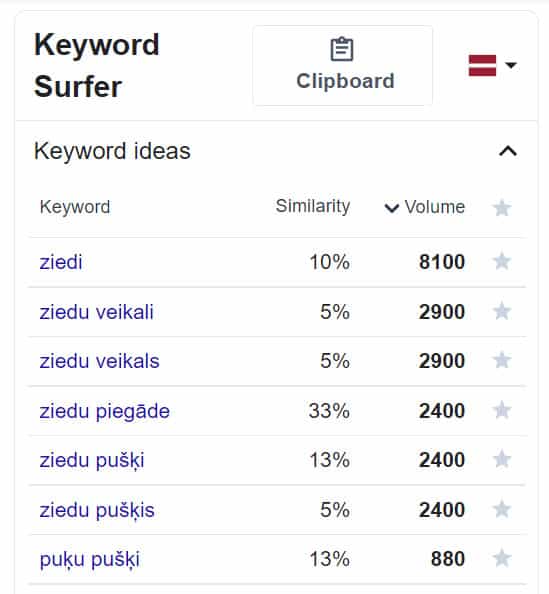
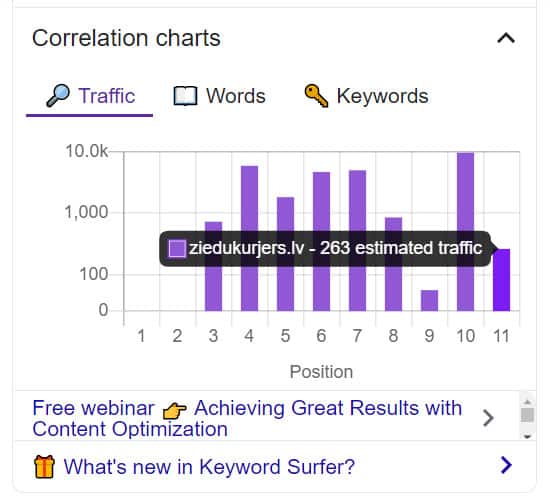
Keyword Surfer also provides a rough estimate of your competitors' website traffic.
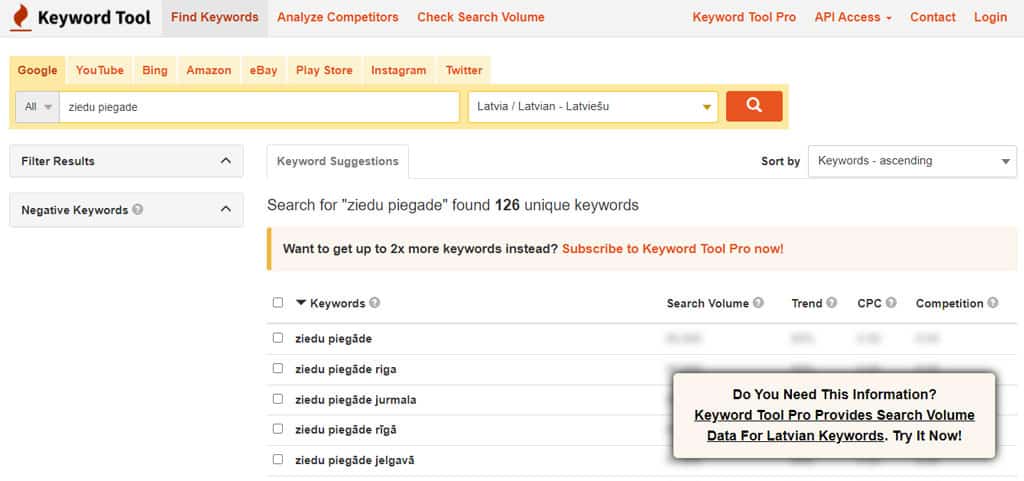
In addition, there are several online resources that can also help you find more keywords, such as - keywordtool.io. The free version only shows keywords, but they can be exported to CSV and Excel or copied. Again - Do a search and record the keywords you find.
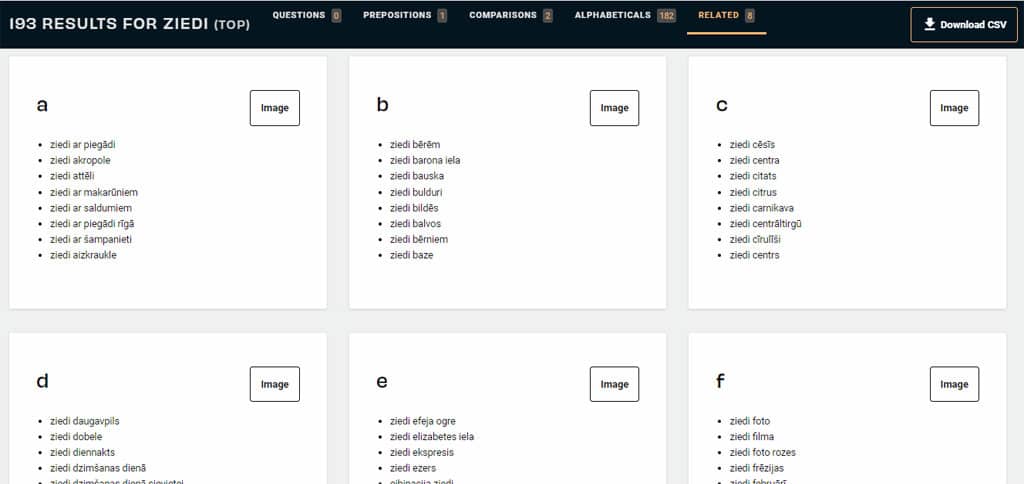
You can also use the one already mentioned Answer the Publicl, where keywords are grouped alphabetically at the bottom of the page. Again - Do a search and record the keywords you find.
At the moment I have 439 keywords in the list, filtering out the same - 376 remain, of which 127 for flower delivery to a specific city (flower delivery riga / flower delivery liepaja…) and 9 for delivery to other countries (flower delivery in Ireland / flower delivery to England… ).
As a result, one keyword is complete. Repeat this process for all the keywords in your list.
When working in a specific industry and analyzing references to competitors' websites in the SERP, you will definitely come up with many other keyword ideas. Remember that keyword research never ends, as search queries change and you come up with new keyword ideas yourself.
The goal is to find the words and phrases that people will not only get to your website when they search for them (they are more likely to make a purchase than other keywords).
You have a list of 376 keywords, but they are not equally popular. The keyword 'flowers' yields around 8,100 searches each month, 'flower delivery' for 2,400 searches, but 'flower courier' for only 170 searches and 'flower delivery for jelgava' for only 40 searches. It probably doesn't make sense to build content by focusing on keywords that aren't used very well or are used very little.
Not all keywords in the list are known to you. Google offers a free keyword evaluation tool Google Trendsshowing graphical search trends for a particular keyword. You also don't need anything more to evaluate how often you use a keyword / search phrase and choose the most appropriate ones.
However, search volume alone can give a false impression of a keyword's potential because:
Therefore, the potential of your keywords should be evaluated by predicting the total traffic to your website, if any article reference will appear in the SERP Top 3. In other words, the importance of the keyword's search volume is declining, but the relevance of the content to the search purpose is becoming increasingly important.
You need to evaluate the potential of the keyword and topic for your business. That is, what is the probability that a person who searches using a particular keyword wants to buy flowers with delivery. Analyze each keyword individually and evaluate its potential - High Purchase Probability (1) / Medium Purchase Probability (2) / Low Purchase Probability (3) / Likely to Make a Purchase (4).
For instance:
How it works in practice You can check by typing "flower delivery", "24/7 flower delivery", "flowers" in the Google search engine and evaluating the differences in how the search results change for each of these keywords.
Or - how much effort will be required to create better / more complete content compared to what is currently at SERP 1. And how long it will take for Google to qualify for the Top 1 or Top 3 search results.
All of the above will be irrelevant if a reference to your article or any other type of content does not appear on the first page of search results in the foreseeable future.
In other words, it's important to understand whether your chosen topic (and keywords) will be able to generate enough traffic in the near future, if not - don't waste your time looking for other topics and keywords.
Although keyword complexity is determined by many factors, the following are the main ones:
An entire article could be written about this, but the truth is that in Latvia (in Latvian) there is little competition compared to English, Russian or other major languages. As a result, getting into the SERP Top 10 is relatively easier. Just type your chosen keyword into a Google search engine and see the first page results:
To see the DA of each existing SERP result, add it to your web browser (Chrome or FireFox) MozBar extensionwhich, when you search for each result, will show the domain authority of that site, how many links from other domains lead to that site, and how many domains those links have placed on their pages.
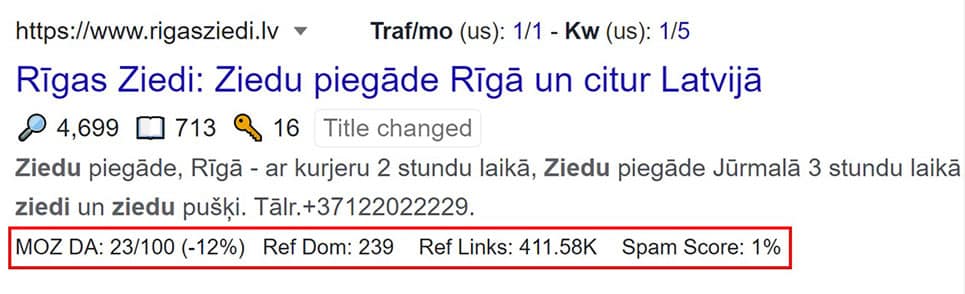
If your DA is above 30, it's best to choose more specific and relevant keywords for your new site. This will get you to the first page of Google search results faster and drive a potentially smaller but steady stream of buyers to your site faster.
Bonus
To connect it, you need a domain that is already accessible on the Internet, as domain verification will be required. The Google Search Console is an indispensable tool for monitoring both site performance and error correction, so we recommend connecting it as soon as possible.
Go to Search Console and follow the instructions (don't forget it connect to Google Analytic). As your site develops, it will accumulate data that will eventually be an indispensable tool for evaluating your site's performance, as the Google Search Console is the place where you can most accurately see your site's performance in organic search results and also find new keyword ideas.
Go to Performance / G Search results. Under Performance on Search results, select Search type: Web and under Date: select the longest possible selection period. You'll see all the keywords that Google responds to when referring to your site in our search results.
More You can read about the data available in the Google Search Console HERE.
This is a VERY powerful tool and has great benefits, as keyword ideas come from Google's database and who knows even better what words are used when searching on Google. Google Keyword Planner offers keyword ideas, some of which you won't find anywhere else.
Google Keyword Planner is completely free. You don't have to create an ad campaign to access Google Keyword Planner - all you need is a Google Account.
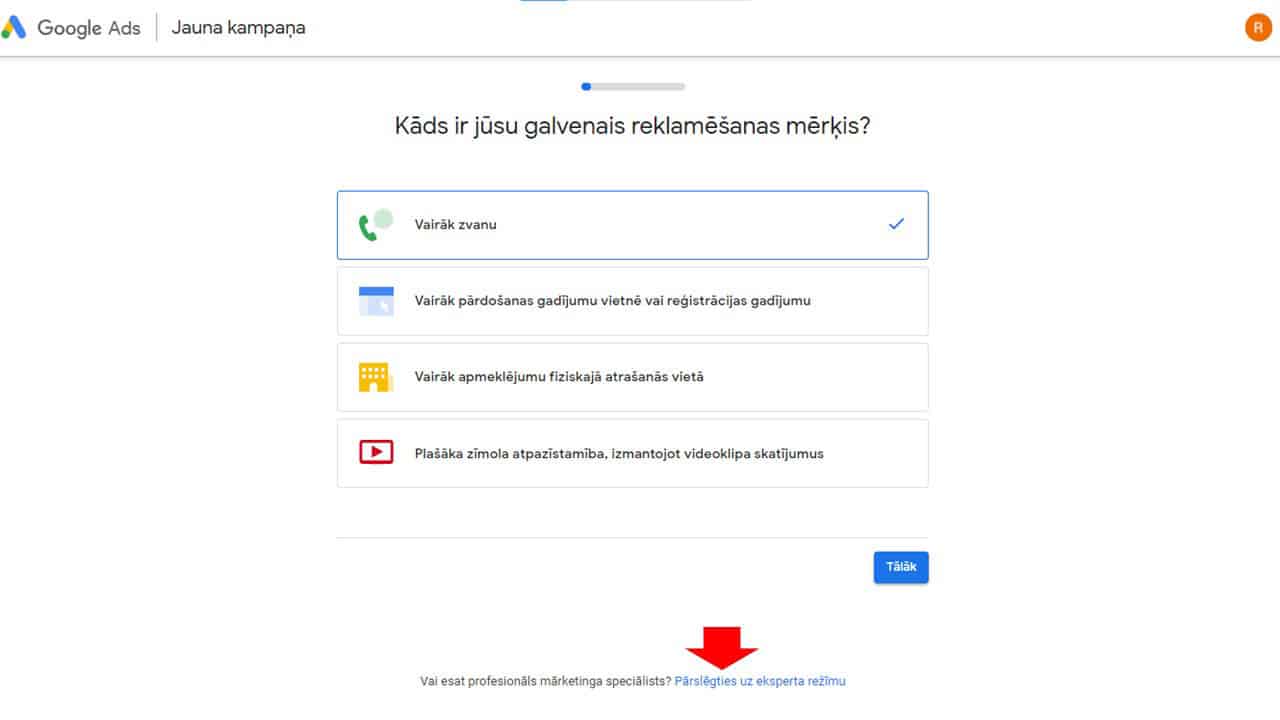
Go to ads.google.com And click the "Start Now" button and follow the instructions. Ignore the menus provided and click "Switch to Expert Mode."
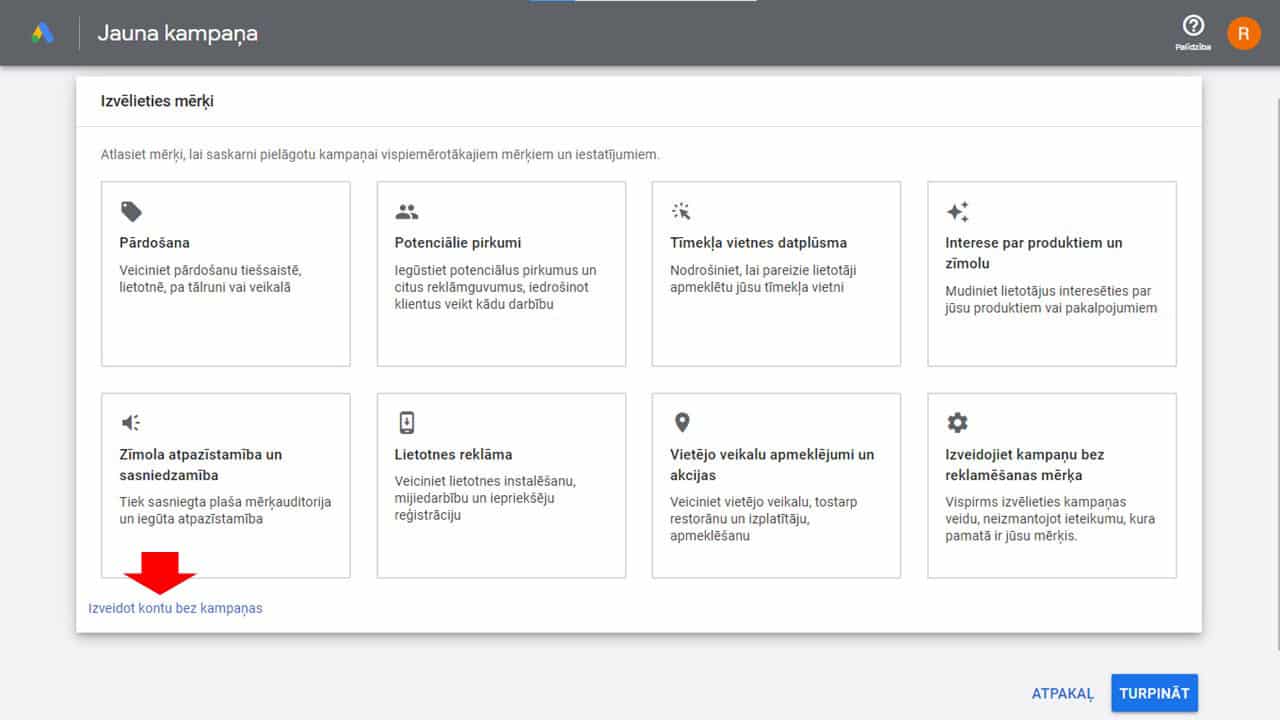
Click 'Create an account without a campaign.'
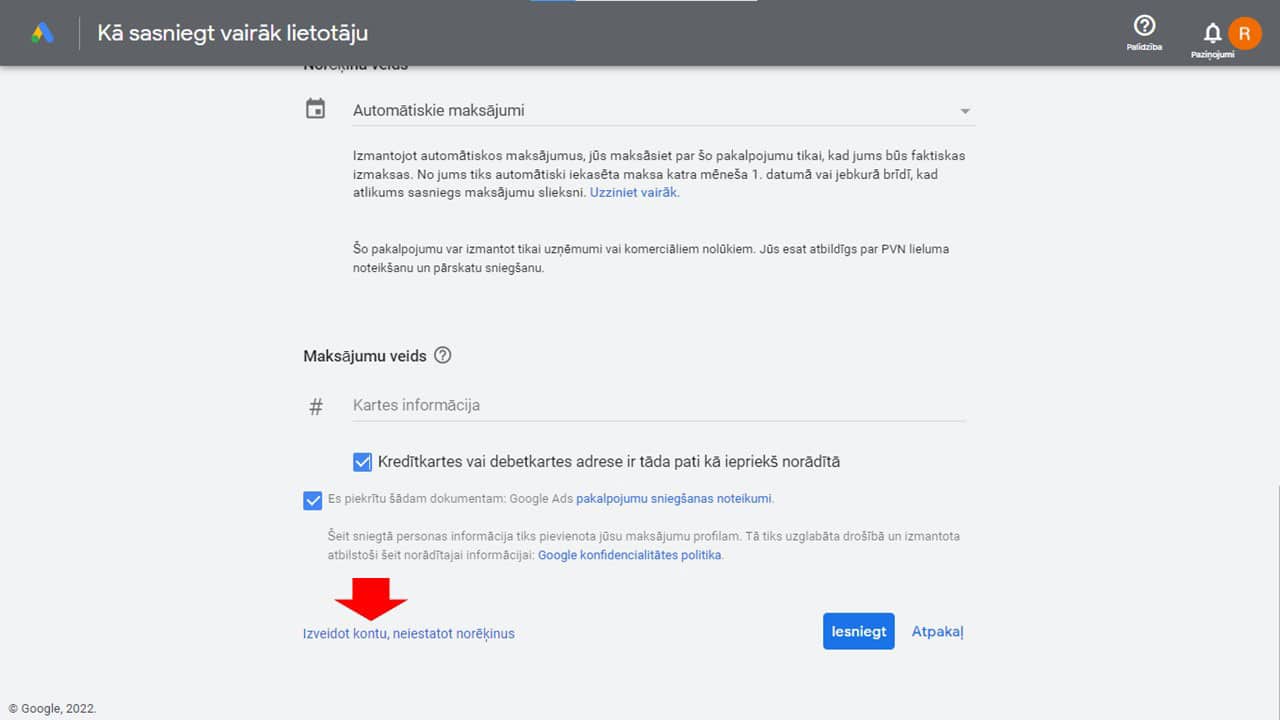
If necessary, correct and confirm your business information by clicking the "Continue" button. On the 'Verify your payment information' page, click 'Create an account without setting up billing' and then the 'Explore your account' button on the next page.
Click the keyword icon and then drop-down menu to 'Keyword Planner.'
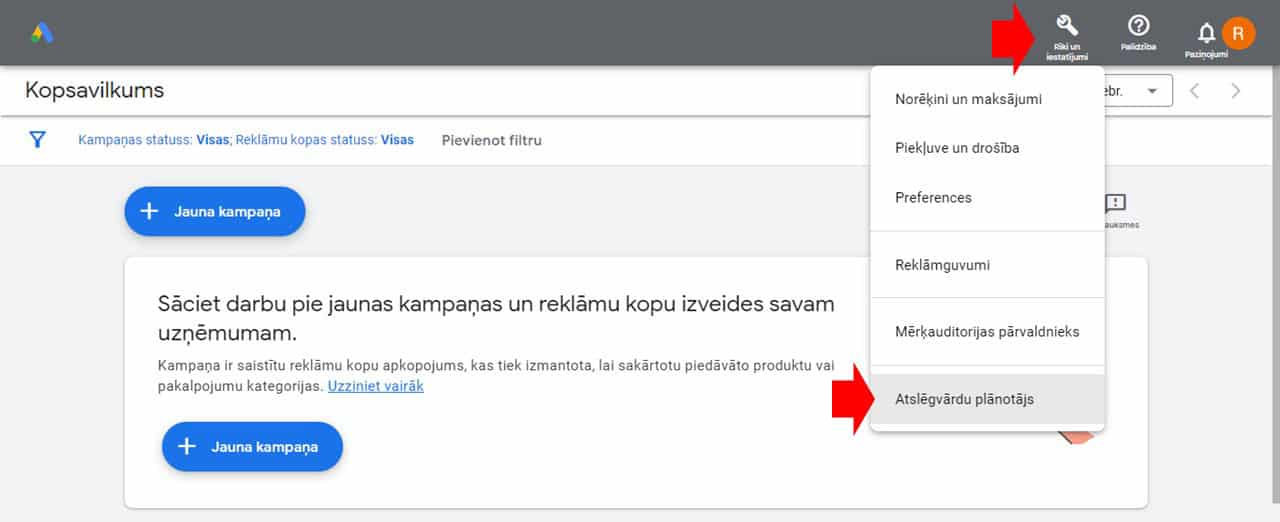
Select 'Discover new keywords.'
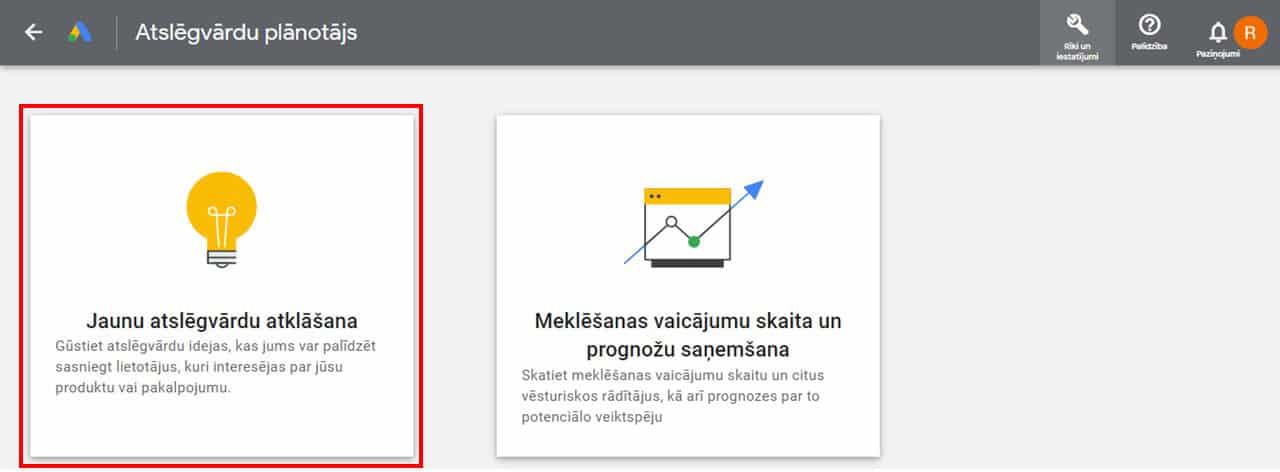
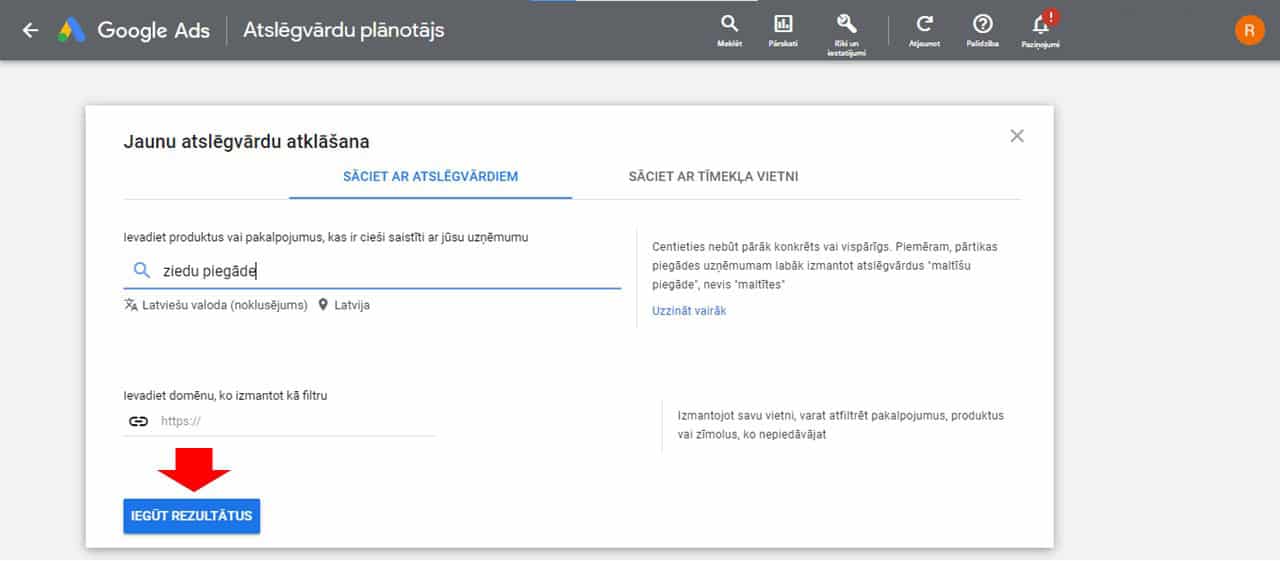
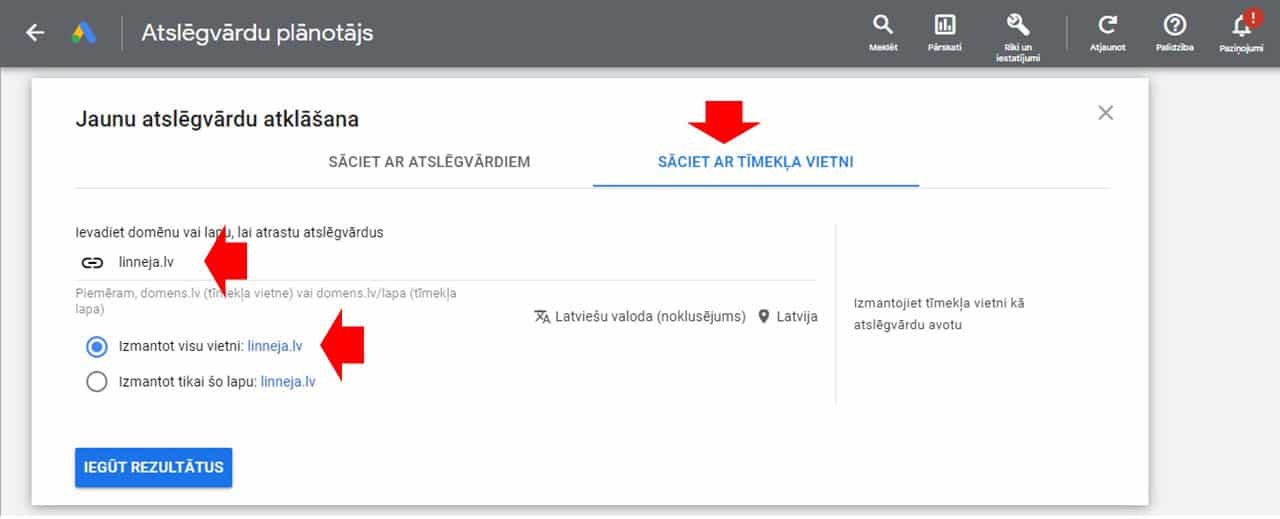
You will see 2 menus - "START WITH KEYWORDS" and "START WITH WEBSITE". Let's look at both options separately.
Enter a keyword, in which case we'll continue with 'flower delivery.' You can add up to 10 keywords, including phrases consisting of multiple words and also domain names. Additionally, you can filter keyword ideas by your own or any other domain. However, if you're aiming to find as many keyword ideas as possible, it's best not to limit Google's suggestions. Click on "GET RESULTS".
Select all the suggested keywords, select 'Exact Match,' and then click 'Add Keywords to Create a Plan.' And then in the menu on the left to "Forecast".
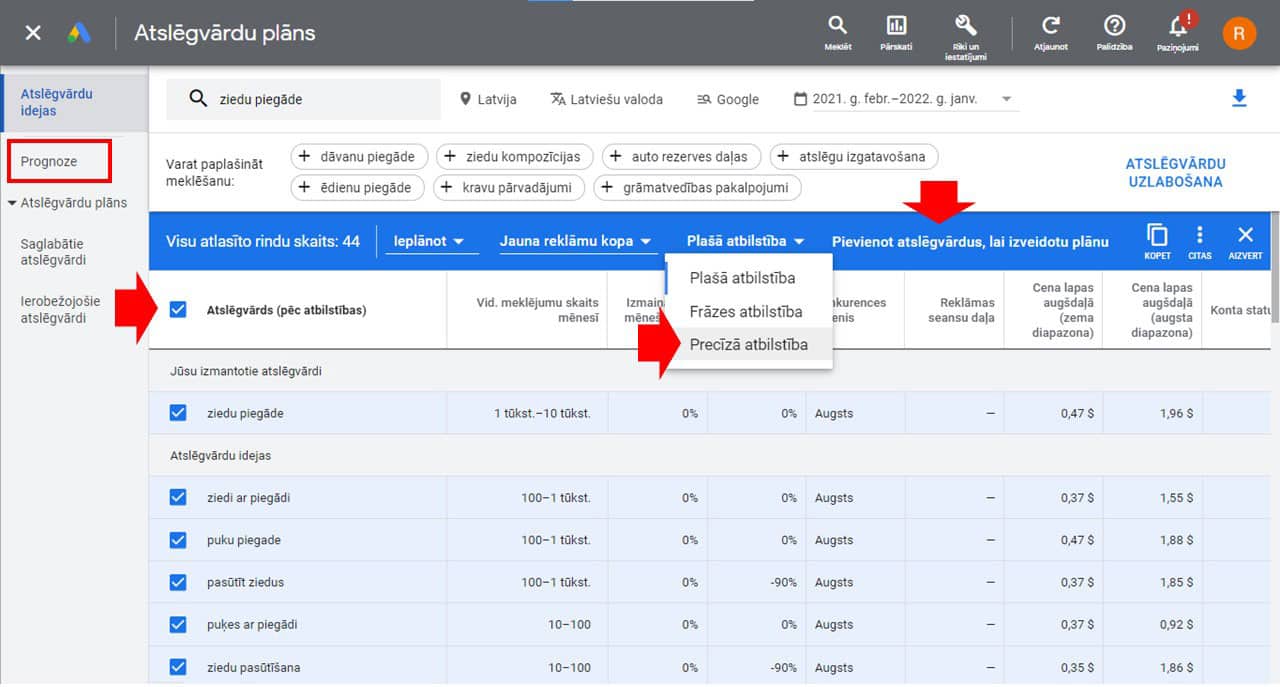
Set your maximum daily budget and select the 'All time' date range.
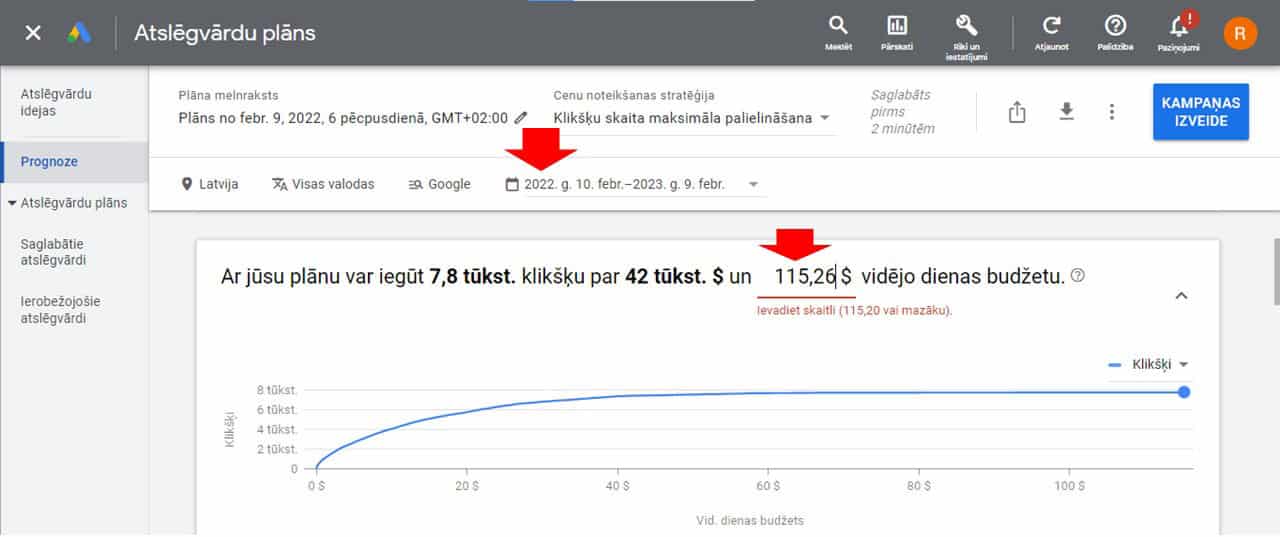
And in the "Clicks" column, you'll see a more specific number of searches for each specific keyword.
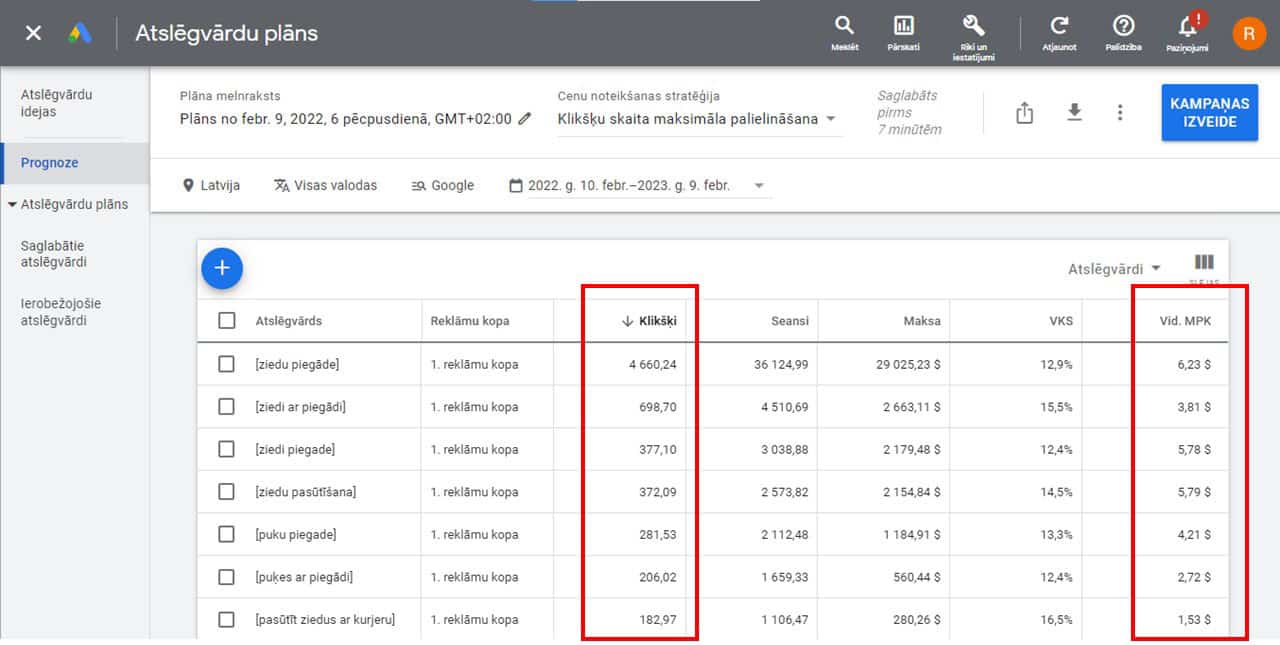
In addition, you have the opportunity to evaluate the commercial potential of each keyword - in the column "Avg. CPC ”(Average Cost-Per-Click) Click the title to sort your CPCs from highest to lowest. The higher the CPC, the more demand there is for this keyword - so it's more likely to be more effective.
Tip. Add the extension to your Chrome browser before you start working with Google Keyword Planner Keywords Everywhere and you may see the number of searches for keyword ideas offered by Google as soon as you enter your keywords (sometimes it doesn't work, I don't know why).

This is the most interesting part, because this option allows you to find out which keywords your competitors have qualified for. Enter a competitor's domain name. We will use the SERP Top 1 reference with the keyword "flower delivery" - the domain "linneja.lv", tick "Use the entire site" and click on "GET RESULTS".
And you see all the keywords that this site has qualified for and the number of searches. Plus the total number of searches on these keywords and the number of searches on individual mobile devices.
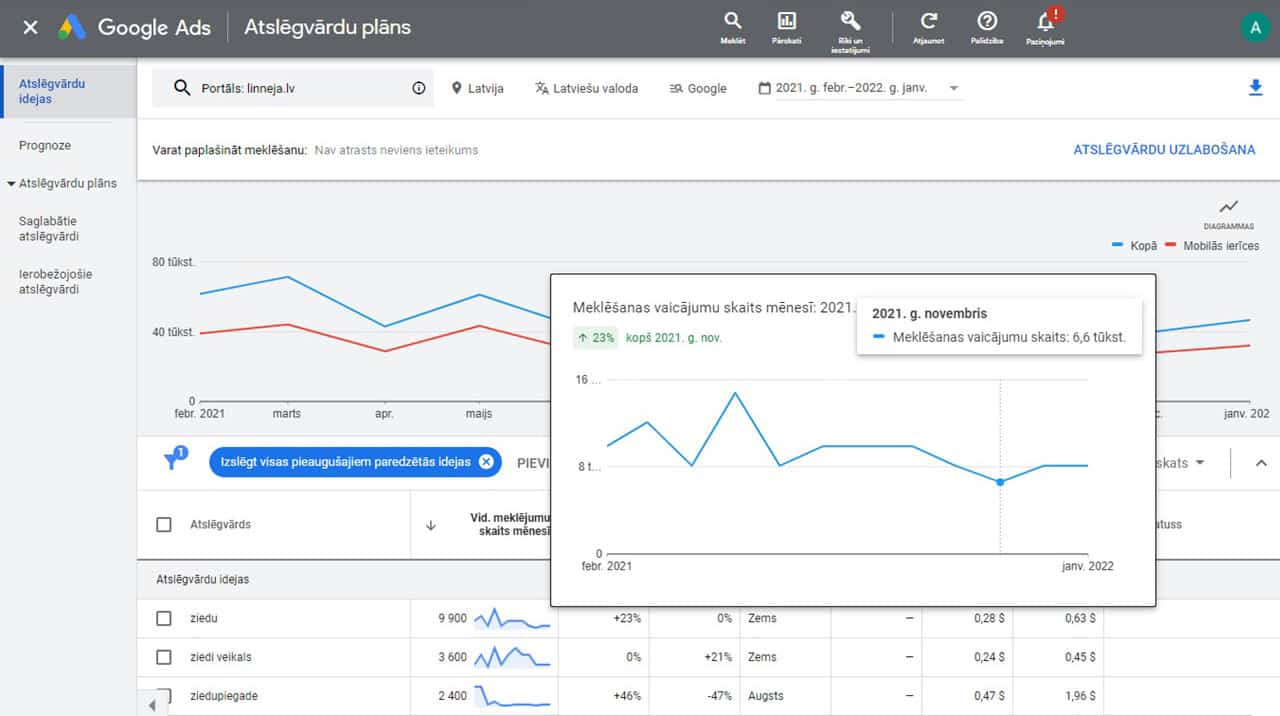
It should be noted that this is the total number of searches on the Google Network, not the number of people who clicked on the link "linneja.lv". And don't take the number of searches listed by Google literally - it's a rough estimate.
That's it. Good luck!
80 responses
I appreciate you sharing this blog post. Thanks Again. Cool.
Nice post. I learn something totally new and challenging on websites
I am truly thankful to the owner of this web site who has shared this fantastic piece of writing at this place.
very informative articles or reviews at this time.
naturally like your web site however you need to take a look at the spelling on several of your posts. A number of them are rife with spelling problems and I find it very bothersome to tell the truth on the other hand I will surely come again again.
I am truly thankful to the owner of this web site who has shared this fantastic piece of writing at this place.
Very well presented. Every quote was awesome and thanks for sharing the content. Keep sharing and keep motivating others.
There is definitely a lot to find out about this subject. I like all the points you made
You're so awesome! I don't believe I have read a single thing like that before. So great to find someone with some original thoughts on this topic. Really.. thank you for starting this up. This website is something that is needed on the internet, someone with a little originality!
I like the efforts you have put in this, regards for all the great content.